
The complete guide to spec-driven development (SDD) with Claude Code
TL;DR: Prompting and looping work fine for isolated tasks and one-off builds, but they break down once more than one contributor is involved or the codebase needs architectural consistency. Spec-driven development (SDD) fixes this by splitting a Claude Code session into three phases, a spec, a plan, and the code, each with its own review checkpoint. Claude Code's Plan Mode, subagents, and hooks already map onto this workflow natively, and teams typically hit break-even on the extra upfront spec time around their fourth or fifth SDD project.
AI coding assistants have already reduced the barrier to writing code. Generating code is now child's play; the hard part is consistently generating the right code across an entire codebase. That involves communicating exactly what the software should do, preserving that intent across iterations, and ensuring every implementation aligns with architectural constraints and business requirements. Spec-driven development solves this problem.
From the 40+ projects we have developed using Claude Code just in 2026, I've identified the key levers that dictate outcomes:
- Prompting, and its extravagant cousin, looping, are good enough for isolated tasks, prototypes, and one-off builds. For example, an experiential marketing microsite we built for AWS reInvent firmly falls in this category.
- They are necessary, but no longer sufficient, when projects involve more than one contributor.
- Anywhere you need architectural consistency. Prompts capture intent only momentarily; they rarely capture the reasoning, constraints, or long-term design decisions that any reasonably complex software needs.
If you are still interacting with AI using the familiar pattern of writing a prompt, reviewing the output, adjusting the prompt, and repeating until the implementation 'looks' right, Spec-Driven Development (SDD) is how you change this workflow.
Instead of treating the prompt as the primary source of truth, SDD places a structured specification at the center of development. The specification defines the expected behavior, functional requirements, constraints, acceptance criteria, and implementation goals before any code is written. AI then becomes an implementation engine that follows the specification rather than attempting to infer missing context from increasingly complex prompts.
From our experience, Claude Code is particularly well suited for this approach. Its agentic workflow, repository awareness, planning capabilities, task execution, and validation loops make it possible to transform software development from iterative prompt refinement into an engineering process driven by clear specifications.
In this guide, we will explore how Spec-Driven Development works inside Claude Code, why it produces more reliable and maintainable software than prompt-driven coding, and how to navigate from writing specifications and researching the codebase to implementation, testing, and continuous refinement. In short, this is our secret sauce to putting AI projects in production for 130+ customers.
No, you cannot just describe it and ship
Claude Code is an agentic coding environment. It's not a glorified answer engine that answers a question and waits. It reads your files, runs commands, and works through problems with real autonomy while you stream the Fifa WC, redirect, or touch grass.
That autonomy is the value proposition.
It also explains why vague prompts are risky: an agent that can act on a wrong assumption will confidently act on it, across your whole codebase, before you get a chance to stop it.
There is a second problem underneath the first: context. Everything Claude Code reads, every command it runs, every file it opens consumes the context window, and model performance measurably degrades as that window fills up. A long, meandering session where you jump from "add this feature" to "also fix that bug" to "wait, back to the feature" degrades Claude performance at the task, because it's now reasoning over a pile of half-relevant history instead of a clean problem statement.
Put those two factors together and, voila, you have the case for SDD.
Give Claude Code a small, precise, single-purpose context for each phase of work, instead of one sprawling conversation that tries to do research, design, and implementation all at once.
What is spec-driven development?
SDD reorganizes an AI coding session around three documents instead of one verbose conversation:
- A spec: Plain language, written before any code exists, describing what a change should do and what it should explicitly not do.
- A plan: The spec broken into a numbered, ordered sequence of implementation tasks, naming the files involved.
- The code: Written against the plan, one task at a time, with a human checkpoint between phases.
Each phase catches a different class of mistakes.
The spec review catches scope creep and solving the wrong root cause.
The plan review catches half-finished designs and approaches that conflict with existing patterns.
The code review catches plans that fail at the first test.
If you are vibe coding, you are collapsing all three checks into a single pass. This is why it's painful and challenging to scale vibe coded products and features (not to mention the enormous costs of rampant token consumption at runtime).
Claude Code already points you toward spec-driven development (SDD)
SDD is not a workaround you are bolting onto Claude Code. In fact, Anthropic's own team recommends similar workflows.
The documented pattern for any non-trivial change is EPIC - Explore, Plan, Implement, and Commit.
- Enter Plan Mode on Claude Code so Claude can read files and answer questions without touching anything yet.
- Ask it to turn that exploration into a concrete implementation plan.
- Review and edit that plan directly.
- Switch out of Plan Mode to let it write code and open a PR.
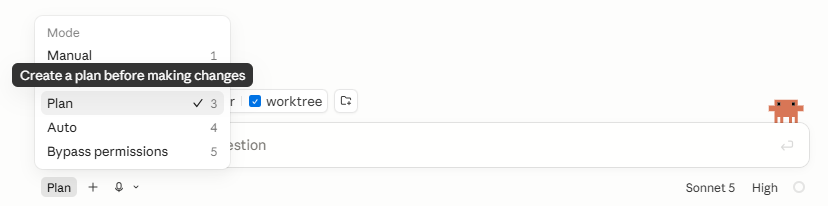
For bigger features, the recommended move is to skip straight to a written spec. Instead of describing the feature yourself, you ask Claude to interview you using its structured question-asking tool about the technical implementation, the UI/UX, the edge cases, and the tradeoffs you haven't thought through yet, and to keep going until it has enough to write a complete spec to a file like spec.md.
When that spec exists and is acceptable, start a fresh session to implement it to leave context baggage behind. The new session will carry a clean context and a target.
The interview and the implementation sessions are different conversations by design. The first is optimized for extracting your intent; the latter is optimized for development.
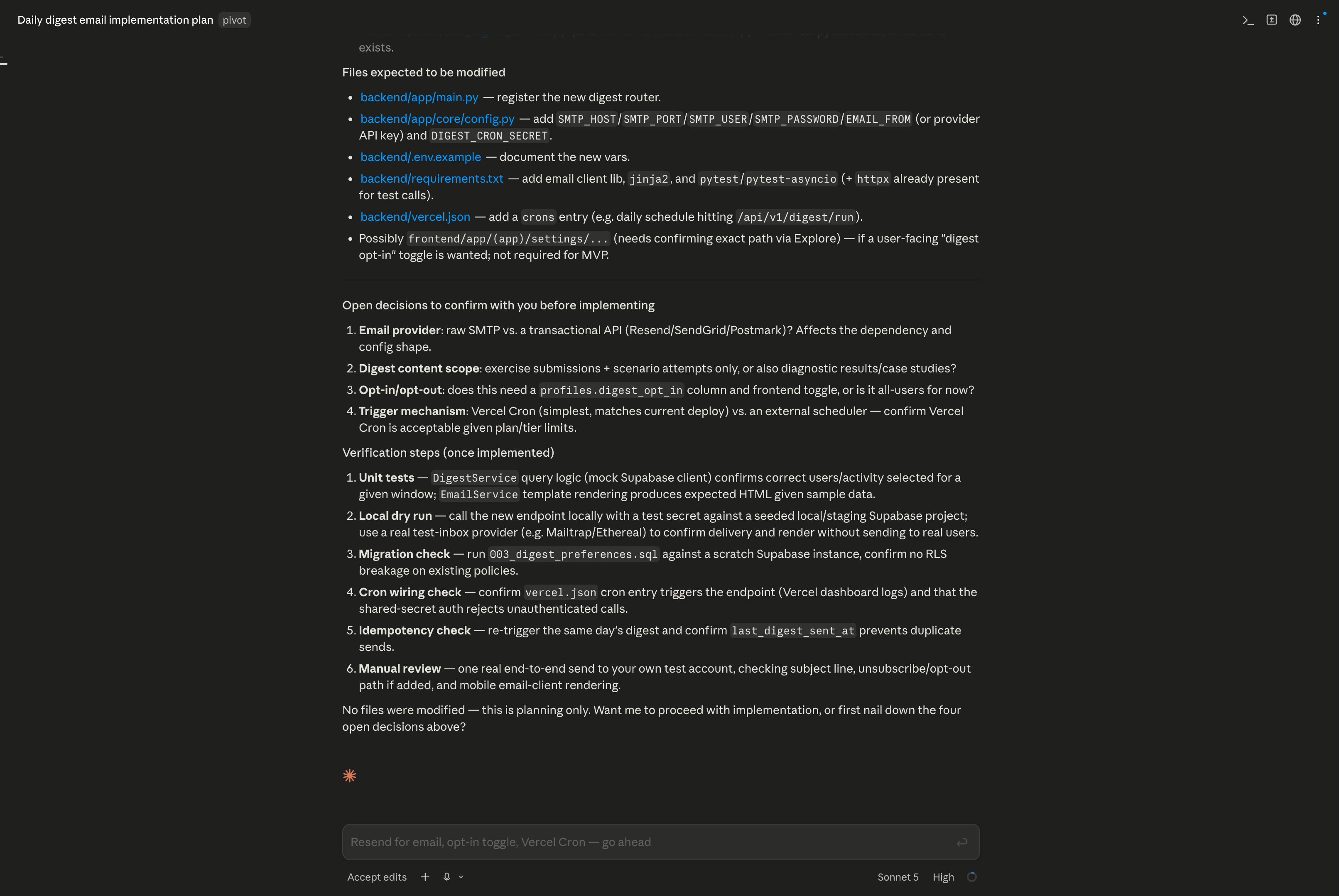
Read-only planning in Claude Code
Claude first explores the codebase in read-only mode, gathers the relevant context, and only then drafts the implementation plan.
The plan then turns that exploration into a concrete sequence of steps, files, and verification checks.
This keeps the work 'grounded' before any code changes happen. This is the key difference between guessing and planning. Claude inspects the codebase first, then converts that understanding into an implementation roadmap.
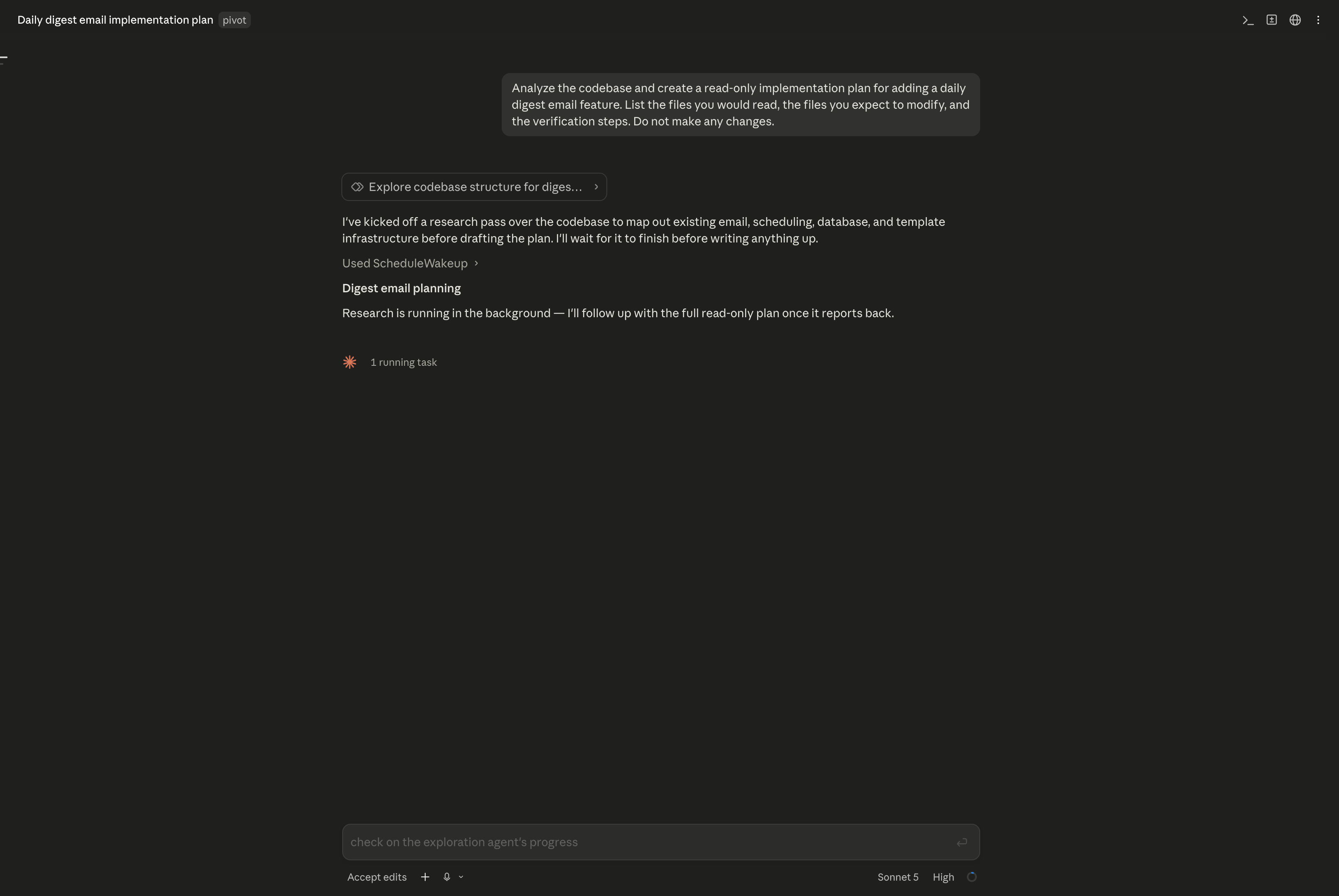
Plan Mode separates discovery from implementation, helping Claude build a grounded plan before any files change.
Plan Mode vs. full spec-driven development on Claude Code
Plan Mode and SDD are not competitors.
SDD is what you get when you take Plan Mode's habits and make them durable.
| Plan Mode | Spec-Driven Development | |
|---|---|---|
| Persistence | In-memory, inside one chat turn | Persisted as a file (SPEC.md, PLAN.md) on disk |
| Survives a session restart or /clear | No | Yes |
| Review checkpoints | One (approve the plan) | Two or three (spec, plan, code) |
| Who else can read it | Nobody. It's in your terminal history. | Anyone with the repo, forever |
| Best for | Contained changes in one session | Multi-file features, refactors, anything spanning multiple sessions or contributors |
If you can describe the eventual diff in one sentence, you don't need either. Just ask Claude Code to do it directly.
From the standpoint of using Claude Code as an acceleration system to get stuff built, Plan Mode and SDD are overhead.
But Plan Mode is valuable when you are uncertain about the approach, the change touches multiple files, or you are unfamiliar with the code being modified.
SDD earns its place over Plan Mode when the work will outlive a single sitting, or when someone other than you must review the "what" before the "how".
I want to share a few stories from our own work.
We developed an AI report generation system with Claude Code that automated ingestion, retrieval, structuring, and full report assembly instead of relying on a single generation step. While Plan Mode wasn't available early in 2025 when we built this, our Claude developers approximated this process with our own internal best practices for Claude Code. In a more recent example, we developed Proxure’s spend analytics platform with Claude Code had to turn natural language into structured analysis, benchmarking, visualizations, and exports while preserving session continuity across queries. We used Plan Mode quite heavily.
Recently, for HealthOrbit, we used Claude Code for clinical documentation automation to support template creation, extraction, validation, publishing, and governance without impacting clinical documentation workflows. Our choice to use spec-driven development with Claude Code was a massive boost!
If we had to go back, we'd build both with SDD today. These are the kinds of builds where the complexity of preserving intent across multiple stages, constraints, and verification loops outweighs the value of generating code fast.
The Claude Code spec-driven development (SDD) workflow
Here is what a full pass looks like for something meatier than a bug fix. In this example, we will add a daily digest email feature to a SaaS product.
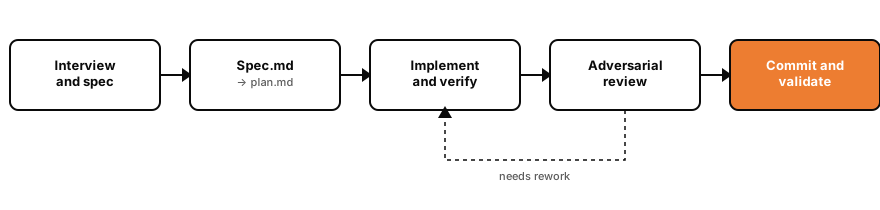
- Interview and spec: Instead of writing the spec yourself, hand Claude a one-line description and ask it to interview you first: what triggers a digest, how do users opt in or out, what happens if a user has zero activity that day, does this need to be idempotent if the job retries, what's explicitly out of scope for v1 (no per-user scheduling, no HTML themes). Claude asks the questions you'd forget to answer up front, then writes the whole thing to spec.md.
- Spec.md: Open a fresh session in Plan mode. Point it at spec.md and ask for an implementation plan: which files change, what order the work happens in, where the new cron job or worker lives, what the test coverage looks like. Pull the plan into your editor, edit it directly, push back on anything that looks like it's solving a different problem than the spec describes. The plan becomes plan.md.
- Implement with a path to verify: This step will decide how much you need to supervise the development. Don't just ask for the feature; give Claude something that returns pass/fail. For example, "Implement task 3 from the plan. Write a test that sends a digest to a user with no activity and asserts it either skips them or sends an empty-state email, matching the spec. Run the suite and fix failures before moving to task 4." Now Claude has a closed loop: write code, run the check, read the result, iterate instead of stopping the moment the code merely looks done.
- Adversarial review: Before you call a task finished, have a fresh subagent review the diff against the plan. Specifically, not a general "does this look okay" pass, but "does every requirement in plan.md show up in this diff, are the edge cases from the spec actually tested, did anything outside this task's scope change." A reviewer working from a clean context, seeing only the diff and the plan, catches things the implementing session is too invested in its own approach to notice.
- Commit and validate: When the plan tasks are all done, go back to the original spec.md. Check the finished feature against it. This is the step that catches drift: a plan can be executed perfectly and still miss something the original spec asked for, if the plan narrowed the scope somewhere along the way.
Get Claude Code to verify its work via SDD
Claude Code stops when work looks done, and without something that returns a real pass/fail signal, "looks done" is the only signal it has. So, you are the verification loop.
The fix is straightforward. Compare these two ways of asking for the same thing:
| Vague | Verifiable |
|---|---|
| implement a function that validates email addresses | write a validate Email function; user@example.com should pass, invalid should fail, user@.com should fail; run the tests after implementing |
| make the digest email look better | here is a screenshot of the target design. implement it, then screenshot the result, compare the two, and fix any differences |
| the export job is failing | the export job fails with this error: [paste it] find the root cause and fix it, don't just suppress the error |
Once a check exists, you can choose how strictly it gates completion: ask Claude to run it and iterate within one prompt, set it as a standing condition that a separate evaluator rechecks after every turn, or wire it into a hook that deterministically blocks the session from ending until the check passes.
Don't let a run finish while you are not watching it at all, which matters more as specs get bigger and the implementation phase gets longer.
Three levels of commitment
Every spec does not need to be a permanent artifact. Thoughtworks' Birgitta Böckeler describes a useful spectrum to decide upfront where a given piece of work sits:
- Spec-first: Write the spec, use it to drive the build, then let it go stale once the feature ships. Fastest, most common, and the easiest to fall out of the habit of maintaining.
- Spec-anchored: Keep the spec alive after the task is done, updating it as the feature evolves, so it stays useful for onboarding and future changes.
- Spec-as-source: The spec is the source of truth going forward. Humans only ever edit the spec; the code is treated as a compiled artifact regenerated from it.
Most teams are spec-first by default without ever choosing it. Deciding on purpose and writing that decision into the spec's own header is part of the discipline.
Configuring Claude Code for spec-driven development (SDD)
Claude Code's native extension points map well to this SDD workflow. Setting them up properly turn SDD from a manual habit into something closer to a repo-level guarantee.
CLAUDE.md is read at the start of every session and reloaded after context compaction. Claude.md is the natural home for pointers into your active specs, your architectural conventions, and the workflow rules you want followed every time. The file does not hold the specs themselves.
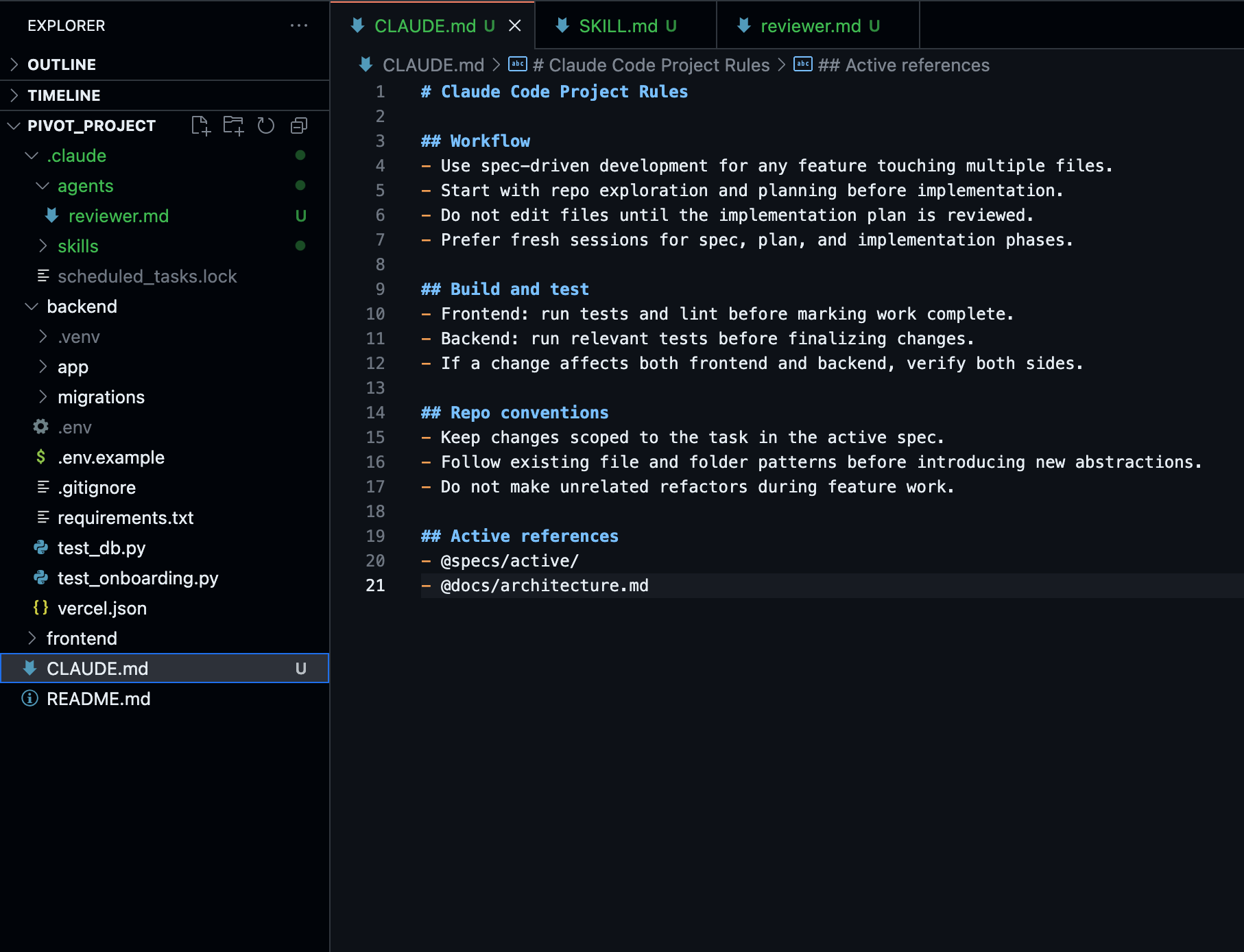
A good CLAUDE.md includes things Claude genuinely can't infer, like non-obvious build commands, testing preferences, and repo etiquette; it should exclude anything Claude could figure out by reading the code, because a bloated file causes it to lose track of the rules that matter. It supports @path/to/file imports, so a short root CLAUDE.md can point to @docs/architecture.md or @specs/active/, and you can layer a personal CLAUDE.local.md (git ignored) alongside the shared, checked-in version.
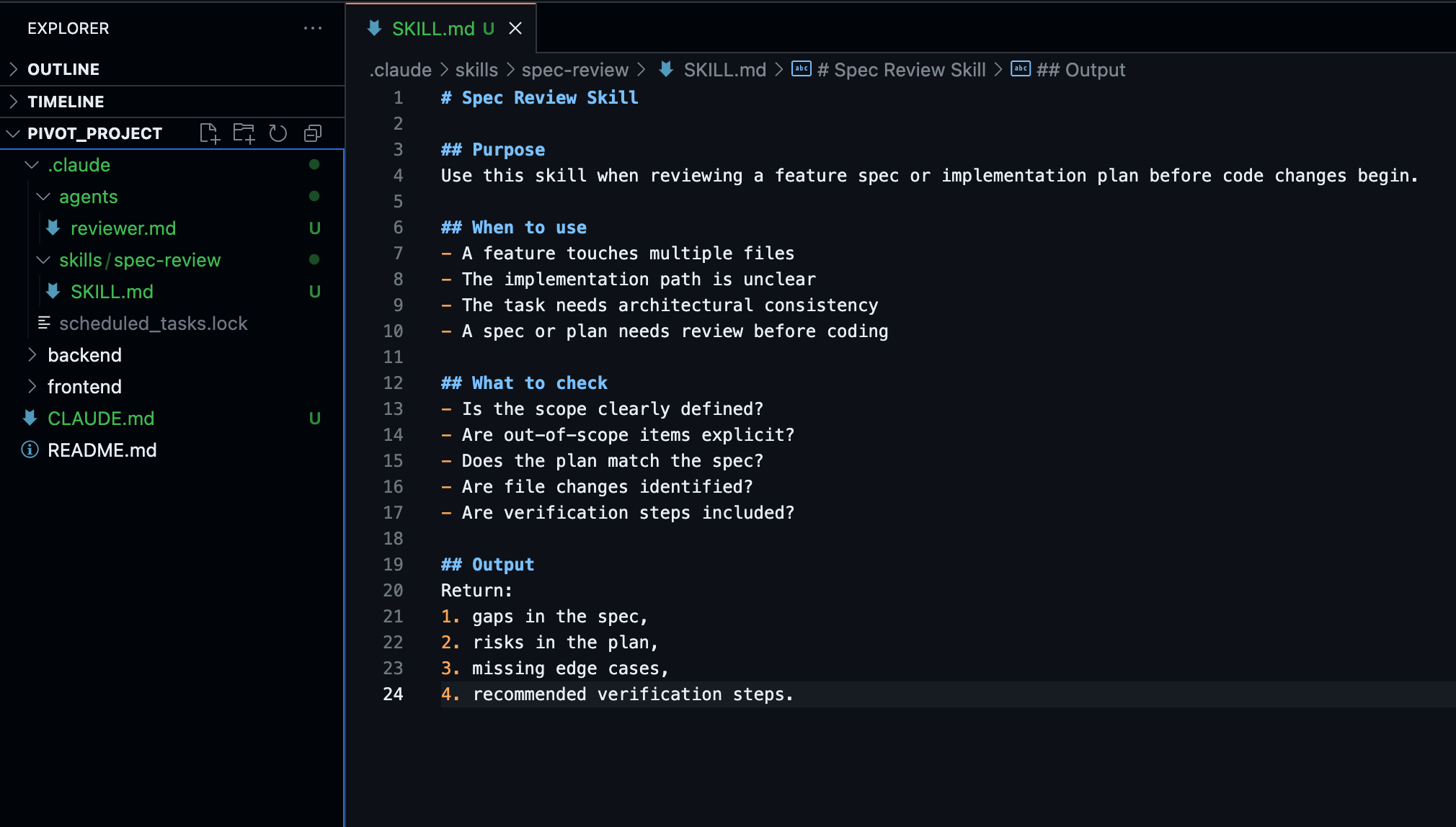
Skills (.claude/skills/*/SKILL.md) are the right place for domain knowledge that is only relevant sometimes. These are loaded on demand instead of bloating every single session the way CLAUDE.md does. API conventions, a recurring "fix an issue end-to-end" workflow, a house style for how specs themselves should be structured live here.
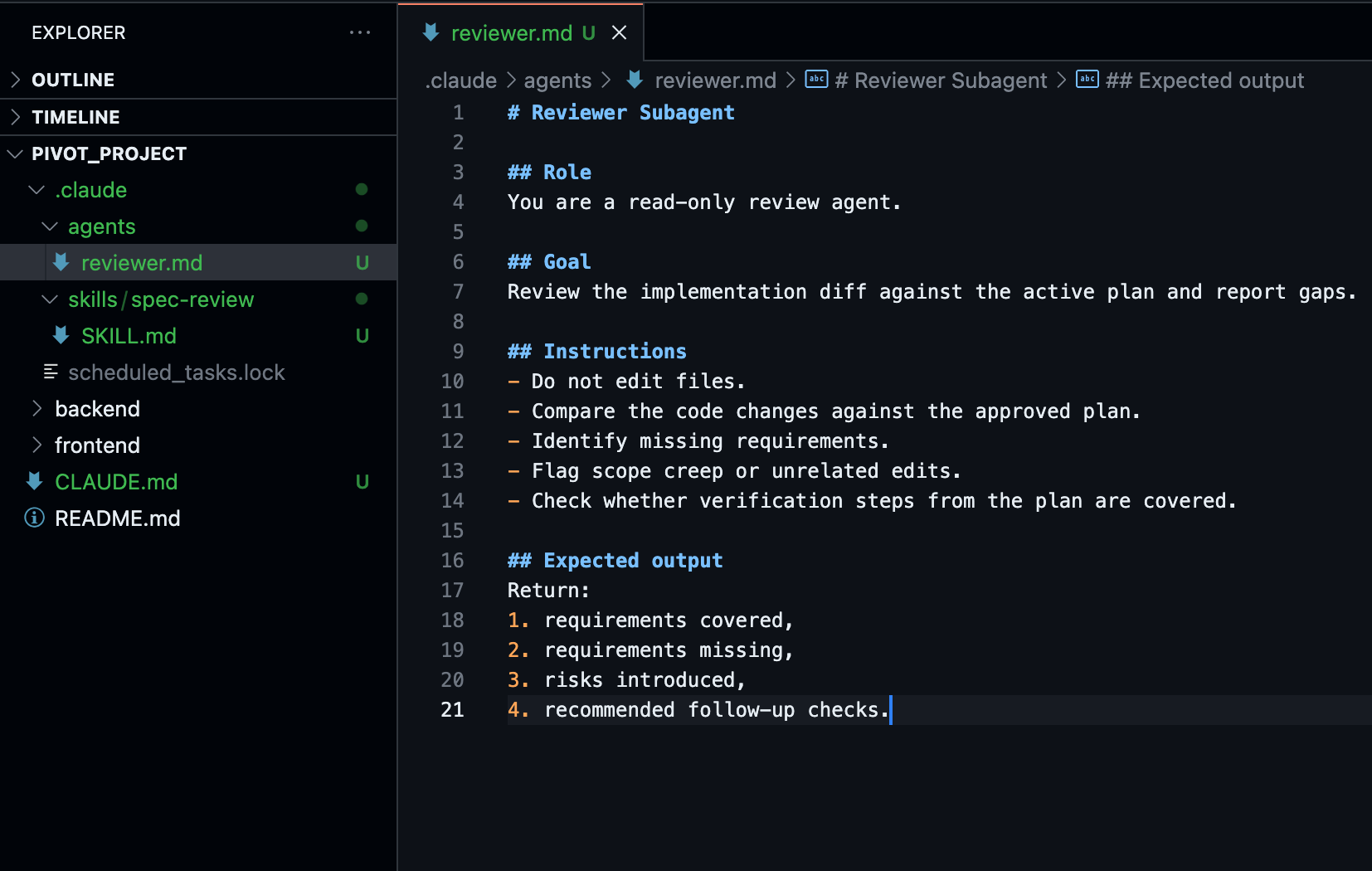
Subagents (.claude/agents/*.md) run in their own context window with their own restricted toolset, which makes them a natural fit for a dedicated reviewer. Give it read-only tools, point it at your plan file, and ask it to report gaps rather than rewrite anything. The best way to get a genuine second opinion is with a subagent evaluating a diff that has no investment in the approach that produced it, unlike the session that just wrote the code.
Hooks are the difference between advisory and deterministic. CLAUDE.md instructions are suggestions the model weighs against everything else in context. A hook is a script that runs automatically and can outright block an action. For example, enforcing that a session cannot end until tests referenced in the plan pass.
Claude Code failure patterns that spec-driven development prevents
A few of the most common ways Claude Code sessions go sideways turn out to be the failure modes SDD's phase separation is designed to catch:
- The vibe coder bloat: Starting one task, getting distracted into an unrelated one, then coming back to the first with a context window full of noise. A fresh session per phase (interview → plan → implement) prevents this by construction.
- The correction loop: Claude gets something wrong, you correct it, it's still wrong, you correct again, and now the context is polluted with failed attempts. Catching the misunderstanding at the spec or plan stage is far cheaper than catching it after failed corrections into an implementation.
- Over-specification: Cramming spec-level detail into CLAUDE.md instead of a dedicated spec file risks important rules getting lost in the noise. Claude Code can, and does, start ignoring rules.
- The trust-then-verify gap: A plausible-looking implementation that doesn't handle the edge cases the spec cared about. This is the purpose of the validation phase and why you need a verification subagent.
When to use spec-driven development in Claude Code
To reiterate, SDD has a cost. The spec phase takes time before any code is generated. Your first few builds with SDD will feel slower than just vibe coding them. You will even resent it. But teams that stick with it tend to maximize productivity over time. My own team reached break-even around the fourth or fifth mini project that we built with Claude Code + SDD.
The payoff is huge when specs start catching design mistakes that would otherwise have merged and needed a rewrite a week later.
A reasonable rule of the thumb: reach for a spec once a change touches more than about four files, involves a refactor with a coherent end state, or the hard part is genuinely "what should this do?" rather than "how do I write this."
Below that line, Plan Mode or a direct, well-scoped prompt is faster and safe enough.
Scaling SDD beyond one person, one session in Claude Code
Once the spec-and-plan pattern is working for a single feature, the same artifacts become the coordination layer for doing more at once:
- Writer/Reviewer across two sessions: One session must implement against the plan and a second, independent session must review the diff against that same plan file. Since the reviewer never saw the implementation reasoning, it evaluates the result objectively afresh. It offers the same benefit as a subagent reviewer, but with a full separate context if the review itself is heavy.
- Parallel worktrees: Multiple tasks from the same plan can run in isolated git worktrees simultaneously. Each Claude session works a different task without stepping on the others' edits.
- Fan-outs: For mechanical, spec-covered work that resolve into many similar, repeatable changes, Auto mode (claude -p on CLI) lets you loop a single prompt over a task list programmatically, with tool permissions scoped since nobody is watching each one execute.
- Agent teams: For long-running, multi task plans, a coordinating session can hand out tasks to a team of workers and track completion against the plan file itself, rather than manually dispatching each one.
Remember, none of this works without the plan being a real, shared, on-disk document.
Spec-driven development scaffolding for Claude Code
If you want more structure than "write markdown files and talk to Claude about them," a small ecosystem has evolved around this pattern.
GitHub's Spec Kit, BMAD-METHOD, Superpowers, and community projects like claude-code-spec-workflow wrap the EPIC loop in slash commands and templates, with varying amounts of enforcement.
Some are as light as a couple of custom commands, while others add a full requirements-design-tasks-implementation pipeline with dedicated validator subagents.
None of them is required. They are merely conveniences layered on top of a workflow you can run today with nothing but CLAUDE.md, a SPEC.md file, and discipline about starting fresh sessions between phases.
Where spec-driven development fails on Claude Code
Claude Code supports spec-driven development workflow well, but it doesn't enforce it end-to-end.
There is no native drift detection that flags when the code has quietly diverged from the spec over time, and no automatic verification that a finished implementation actually satisfies every acceptance criterion in the original document.
The closest built-in approximation is an agent re-reading notes and git history at the start of a session, which checks state, not spec compliance. The gap is closed by the human review at each phase gate, not by the tooling.
SDD raises the ceiling on what Claude Code can build correctly but it certainly does not remove the need to check its work against what you asked for.
The bottom line with spec-driven development on Claude Code
Vibe coding treats the prompt as the spec and the code as the only record of what happened. With spec-driven development, the spec is the record of what should happen, and the code is the compiled version of it. Claude Code already gives you everything the loop needs, like Plan Mode and the interview pattern to produce the spec, fresh sessions to keep each phase's context clean, subagents for an honest second opinion, hooks for enforcement that doesn't rely on the model remembering, and checkpoints to rewind cleanly when a task goes sideways.
The only missing ingredient is, however, the most important part – the habit itself. The next time your project needs a change that will touch more than four files, open a markdown file. Ask Claude to interview you about it and let it write the spec before either of you writes a line of code.
Related Tools and References
GitHub Spec Kit – spec-driven harness for AI coding agents: https://github.com/github/spec-kit
BMAD-METHOD – structured planning and orchestration for Claude Code: https://github.com/bmad-code-org/BMAD-METHOD
claude-code-spec-workflow – end‑to‑end SDD workflow for Claude Code: https://github.com/Pimzino/claude-code-spec-workflow
Superpowers – Claude Code skills framework and enforced dev workflow: https://github.com/obra/superpowers
Frequently Asked Questions
What is spec-driven development (SDD) on Claude Code?
SDD reorganizes a Claude Code session around three documents instead of one long conversation: a spec describing what a change should and should not do, a plan that breaks the spec into ordered implementation tasks, and the code written against that plan, with a review checkpoint between each phase.
How is SDD different from Claude Code's Plan Mode?
Plan Mode lives in memory inside a single chat turn and doesn't survive a session restart or /clear, with one review checkpoint. SDD persists the spec and plan as files on disk, survives restarts, and adds two or three review checkpoints instead of one, making it suited to multi-file features and work that spans multiple sessions or contributors.
What is the EPIC methodology for Claude Code?
EPIC (Explore, Plan, Implement, and Commit) is Anthropic's documented pattern for any non-trivial change: enter Plan Mode so Claude can read files and answer questions, turn that exploration into a plan, review and edit the plan directly, then switch out of Plan Mode to let Claude write code and open a PR.
When should I use spec-driven development instead of Plan Mode or a direct prompt?
A reasonable rule of thumb from the guide: reach for a spec once a change touches more than about four files, involves a refactor with a coherent end state, or the hard part is genuinely "what should this do?" rather than "how do I write this." Below that line, Plan Mode or a direct, well-scoped prompt is faster and safe enough.
How do I configure Claude Code for spec-driven development?
Four native extension points map onto SDD: CLAUDE.md for pointers to active specs and architectural conventions, Skills for on-demand domain knowledge, Subagents for an independent reviewer working from a clean context, and Hooks for deterministic enforcement, like blocking a session from ending until tests referenced in the plan pass.
Is spec-driven development required to use Claude Code well?
No. None of the ecosystem tooling around SDD, like GitHub's Spec Kit, BMAD-METHOD, Superpowers, or claude-code-spec-workflow, is required. The workflow can run today with nothing but CLAUDE.md.